Code Generation Showdown: Gemma 4 vs Qwen 3.6 on a Consumer GPU — Same Prompt, Four Models, One Shot
Using multiple AI coding tools and losing track of sessions? I built VibeCockpit — one dashboard to search and resume sessions across Claude Code, Copilot, Codex, and more.
TL;DR: Same creative coding prompt, four local models, one shot — no feedback loop, no manual fixes. Gemma 4 MoE was the most reliable: fastest, zero runtime bugs across all rounds. Qwen 3.6 MoE produced better-looking output but shipped at least one bug every time. Dense models were 3.5x slower and not competitive on 16 GB consumer GPUs. For single-shot code generation on cards like the RTX 5060 Ti, 3060 12 GB, or 4060 Ti 16 GB — MoE is the way to go.
After benchmarking Gemma 4’s inference speed and context window, I wanted to test something more practical: can these models write working code on the first try? Not HumanEval toy functions — real, visual, multi-hundred-line programs that either render in the browser or don’t.
The key constraint: one shot, no feedback loop. Each model gets the prompt exactly once. No “fix the error on line 42,” no iterating. The output either works or it doesn’t. This is deliberately harsh — in practice you’d use a coding agent with error feedback — but it isolates raw code generation quality.
The Setup
Same machine as all my previous benchmarks:
- RTX 5060 Ti 16 GB over OCuLink (PCIe 4.0 x4)
- llama.cpp mainline, built from source with CUDA
These results should be representative of any 16 GB consumer GPU (RTX 3060 12 GB, 4060 Ti 16 GB, etc.) — the models and quants fit in that VRAM range, and generation quality depends on the model weights, not the specific card.
| Model | Type | Active Params | Quant | VRAM |
|---|---|---|---|---|
| Gemma 4 26B-A4B | MoE | 3.8B | IQ3_XXS | 13.2 GB |
| Qwen 3.6 35B-A3B | MoE | 3B | IQ3_S | 15.5 GB |
| Gemma 4 31B | Dense | 30.7B | IQ3_XXS | 13.8 GB |
| Qwen 3.6 27B | Dense | 27B | IQ3_XXS | 14.4 GB |
All runs use temperature: 0.6, top_p: 0.95, max_tokens: 16384. All models had thinking enabled — thinking tokens are included in the completion token counts. Gemma consistently thought 2–8x more than Qwen (600–1300 words vs 140–490 words), yet was still faster overall. Why? Gemma writes much more concise code — its total output (thinking + code) is still fewer tokens than Qwen’s, and it generates at ~95 t/s vs Qwen’s ~90 t/s. More thinking, less code, faster per token. The benchmark script sends each prompt via the OpenAI-compatible API, extracts the HTML, and records stats. Full cold start between models.
View llama-server configurations
All models share a common base: full GPU offload, flash attention, q4_0 KV cache, context-shift enabled, single slot. Gemma models get additional tuning flags.
Gemma 4 MoE (26B-A4B)
llama-server \
  -m gemma-4-26B-A4B-it-UD-IQ3_XXS.gguf \
  -ngl 99 -fa on -c 262144 \
  -ctk q4_0 -ctv q4_0 \
  --context-shift --cache-reuse 512 \
  --no-mmap -np 1 -t 6 --jinja \
  --kv-unified --perf --no-warmup --mlock \
  -b 512 -ub 256 -tb 6 --threads-http 8 \
  --port 11433
Qwen 3.6 MoE (35B-A3B)
llama-server \
  -m Qwen3.6-35B-A3B-UD-IQ3_S.gguf \
  -ngl 99 -fa on -c 262144 \
  -ctk q4_0 -ctv q4_0 \
  --context-shift --cache-reuse 512 \
  --no-mmap -np 1 -t 6 --jinja \
  --port 11433
Gemma 4 Dense (31B)
llama-server \
  -m gemma-4-31B-it-UD-IQ3_XXS.gguf \
  -ngl 99 -fa on -c 65536 \
  -ctk q4_0 -ctv q4_0 \
  --context-shift --cache-reuse 512 \
  --no-mmap -np 1 -t 6 --jinja \
  --kv-unified --perf --no-warmup --mlock \
  -b 512 -ub 256 -tb 6 --threads-http 8 \
  --port 11433
Qwen 3.6 Dense (27B)
llama-server \
  -m Qwen3.6-27B-UD-IQ3_XXS.gguf \
  -ngl 99 -fa on -c 131072 \
  -ctk q4_0 -ctv q4_0 \
  --context-shift --cache-reuse 512 \
  --no-mmap -np 1 -t 6 --jinja \
  --port 11433
Key flags: -ngl 99 (full GPU offload), -fa on (flash attention), -np 1 (single slot), -ctk/-ctv q4_0 (quantized KV cache to fit larger context windows), --context-shift (handles context overflow gracefully). Gemma models use --kv-unified for its iSWA architecture. See the Gemma 4 context window post for why Gemma MoE gets 262K while Dense is limited to 65K.
Round 1: Three.js Solar System
Planets orbiting a glowing sun with labels, Saturn’s rings, Earth’s moon.
View full prompt
Create a single standalone index.html file that simulates the solar system using Three.js loaded from a CDN.
Requirements:
- Sun at the center with emissive glow
- All 8 planets orbiting at different speeds and distances
- Earth has a Moon orbiting it
- Saturn has visible rings
- Realistic relative sizes (not to scale with distances — make it visually appealing)
- Ambient starfield background
- Smooth orbital animation
- OrbitControls for camera (zoom, pan, rotate)
- Dark background, good lighting
- Labels for each planet (HTML overlay or sprite)
- Responsive, fills the full viewport
Output ONLY the complete HTML file, no explanation before or after.
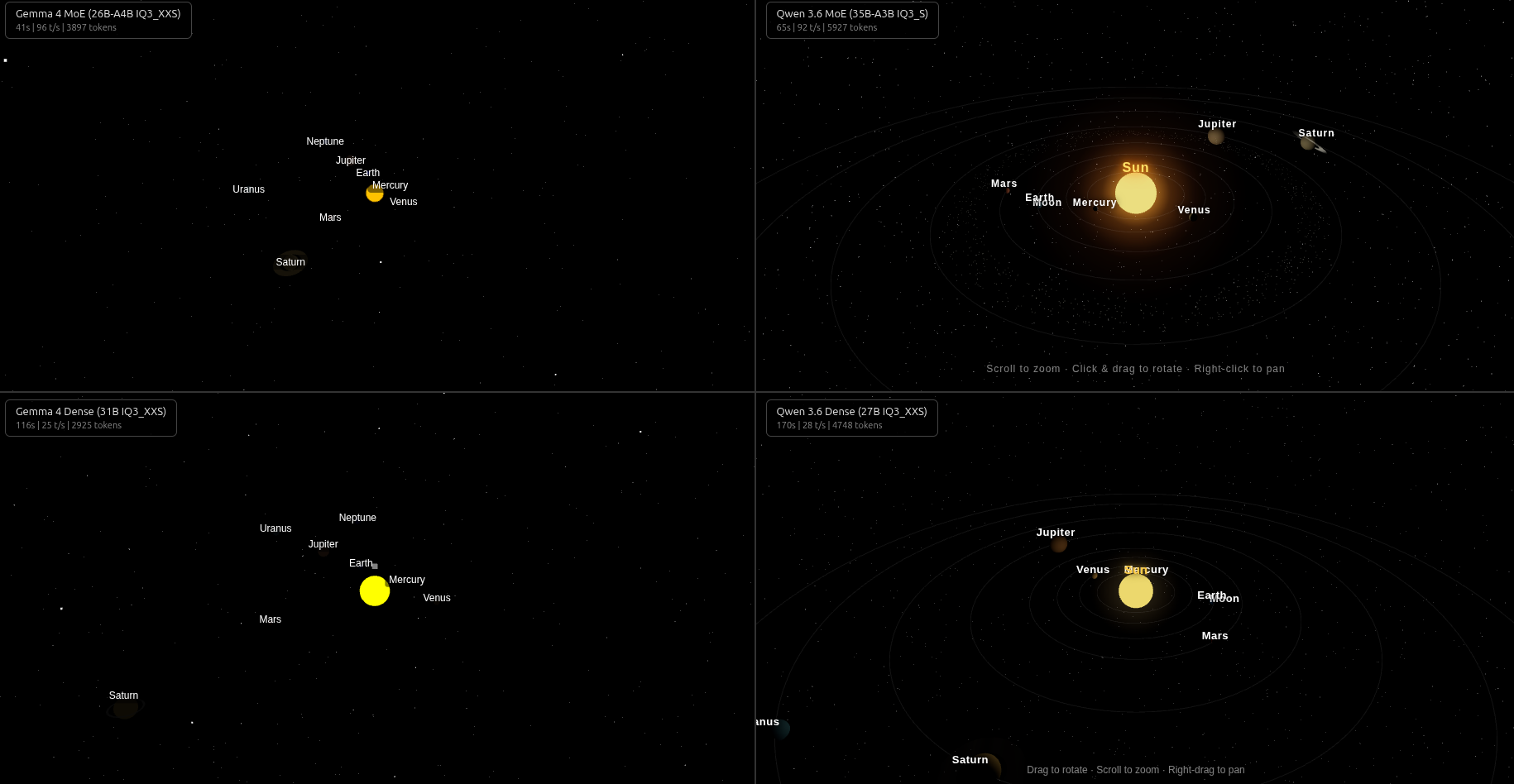
| Model | Time | Gen t/s | Tokens | Thinking | HTML | Works? |
|---|---|---|---|---|---|---|
| Gemma 4 MoE | 41s | 96 | 3,897 | 629 words | 223L | Yes |
| Qwen 3.6 MoE | 65s | 92 | 5,927 | 454 words | 422L | Yes |
| Gemma 4 Dense | 116s | 25 | 2,925 | 310 words | 183L | No |
| Qwen 3.6 Dense | 170s | 28 | 4,748 | 491 words | 328L | No |
Both MoE outputs rendered on the first try. Qwen’s had more polish (12,000-star starfield, sun glow sprite, orbit lines) but took 60% longer. Both dense models broke — Gemma Dense used legacy Three.js UMD imports (removed in r160), Qwen Dense passed strings instead of DOM elements to CSS2DObject().
Round 2: Procedural F1 Car
Procedural 3D geometry — spatial reasoning required.
View full prompt
Create a single standalone index.html file that renders a realistic 3D model of a Formula 1 car using Three.js loaded from a CDN.
Requirements:
- Build the car geometry procedurally (no external model files) — use combined Three.js geometries (boxes, cylinders, spheres, extrusions, etc.)
- Realistic F1 proportions: long narrow nose, wide front and rear wings, side pods, cockpit opening, rear diffuser, halo device, large rear wing with DRS-style flap
- Four low-profile tires with visible rims
- Red livery with white/black accents (Ferrari-inspired)
- Metallic/glossy materials with proper lighting reflections
- Ground plane with subtle grid or shadow
- Environment lighting (HDR-style) for realistic reflections — use PMREMGenerator or similar
- Smooth camera orbit (OrbitControls) with good default angle
- Responsive, fills the full viewport, dark background
- The car should be centered and properly scaled
Output ONLY the complete HTML file, no explanation before or after.
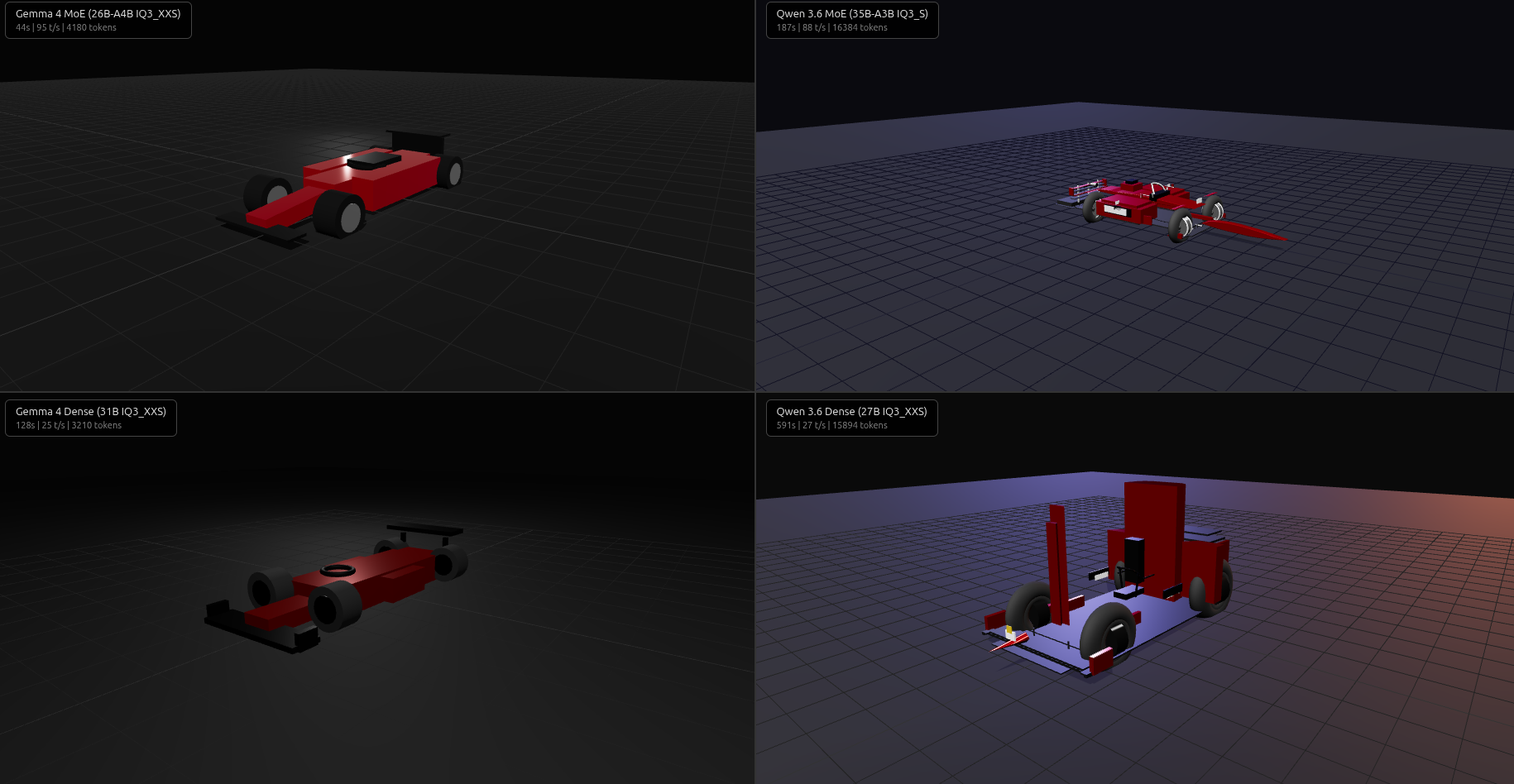
| Model | Time | Gen t/s | Tokens | Thinking | HTML | Works? | Bugs |
|---|---|---|---|---|---|---|---|
| Gemma 4 MoE | 44s | 95 | 4,180 | 768 words | 206L | Yes | 0 |
| Qwen 3.6 MoE | 187s | 88 | 16,384 | 156 words | 933L | No | 1 |
| Gemma 4 Dense | 128s | 25 | 3,210 | 386 words | 192L | No | 2 |
| Qwen 3.6 Dense | 591s | 27 | 15,894 | 248 words | 692L | No | 5 |
Only Gemma MoE produced working code. Less detailed than Qwen’s attempt, but spatially correct — parts were where they should be.
Qwen MoE generated 933 lines with halo, DRS flap, barge boards, mirrors, brake discs, cable routing — but one typo killed it: addPart('right', false)) instead of addPart(createWheel('right', false)). After fixing it, the ambitious detail didn’t fully translate into spatially correct 3D.
Qwen Dense had 5 bugs across 692 lines (missing parens, duplicate declarations, temporal dead zone, hallucinated API) and took 591s — nearly hitting the 600s timeout. Gemma Dense had an undeclared variable assignment and wrong toneMapping API.
Round 3: p5.js Animated Panda
A shift to 2D. This prompt included a p5.js API reference to prevent hallucinated function names.
View full prompt
Create a single standalone index.html file that shows an animated panda eating bamboo using p5.js loaded from a CDN.
p5.js quick reference:
- Load via:
<script src="https://cdn.jsdelivr.net/npm/p5@1.9.4/lib/p5.min.js"></script> - Define setup() to initialize canvas: createCanvas(windowWidth, windowHeight)
- Define draw() for the animation loop (runs ~60fps)
- Drawing primitives: ellipse(x,y,w,h), rect(x,y,w,h), arc(x,y,w,h,start,stop), triangle(), line(), bezier(), quad()
- Colors: fill(r,g,b), stroke(r,g,b), noStroke(), strokeWeight(n), background(r,g,b)
- Transforms: push()/pop(), translate(x,y), rotate(angle), scale(s)
- Math: sin(), cos(), map(), lerp(), noise(), random(), millis(), frameCount
- Text: textSize(n), textAlign(CENTER), text(str,x,y)
- Use windowResized() with resizeCanvas() for responsive sizing
Requirements:
- A cute cartoon panda character (black and white, round body, ears, eye patches, arms, legs)
- The panda is sitting and holding a bamboo stalk
- Animate the panda chewing: mouth opens and closes rhythmically, head bobs slightly
- The panda’s arm moves the bamboo toward/away from the mouth in sync with chewing
- Bamboo stalk drawn with segments, nodes, and a few leaves
- Peaceful background scene: soft gradient sky, rolling green hills, a few bamboo stalks in the background
- Subtle ambient animations: leaves swaying, clouds drifting, maybe butterflies or fireflies
- Smooth, looping animation using sin/cos for organic movement
- Responsive canvas that fills the viewport
- No external assets — everything drawn procedurally with p5.js primitives
Output ONLY the complete HTML file, no explanation before or after.
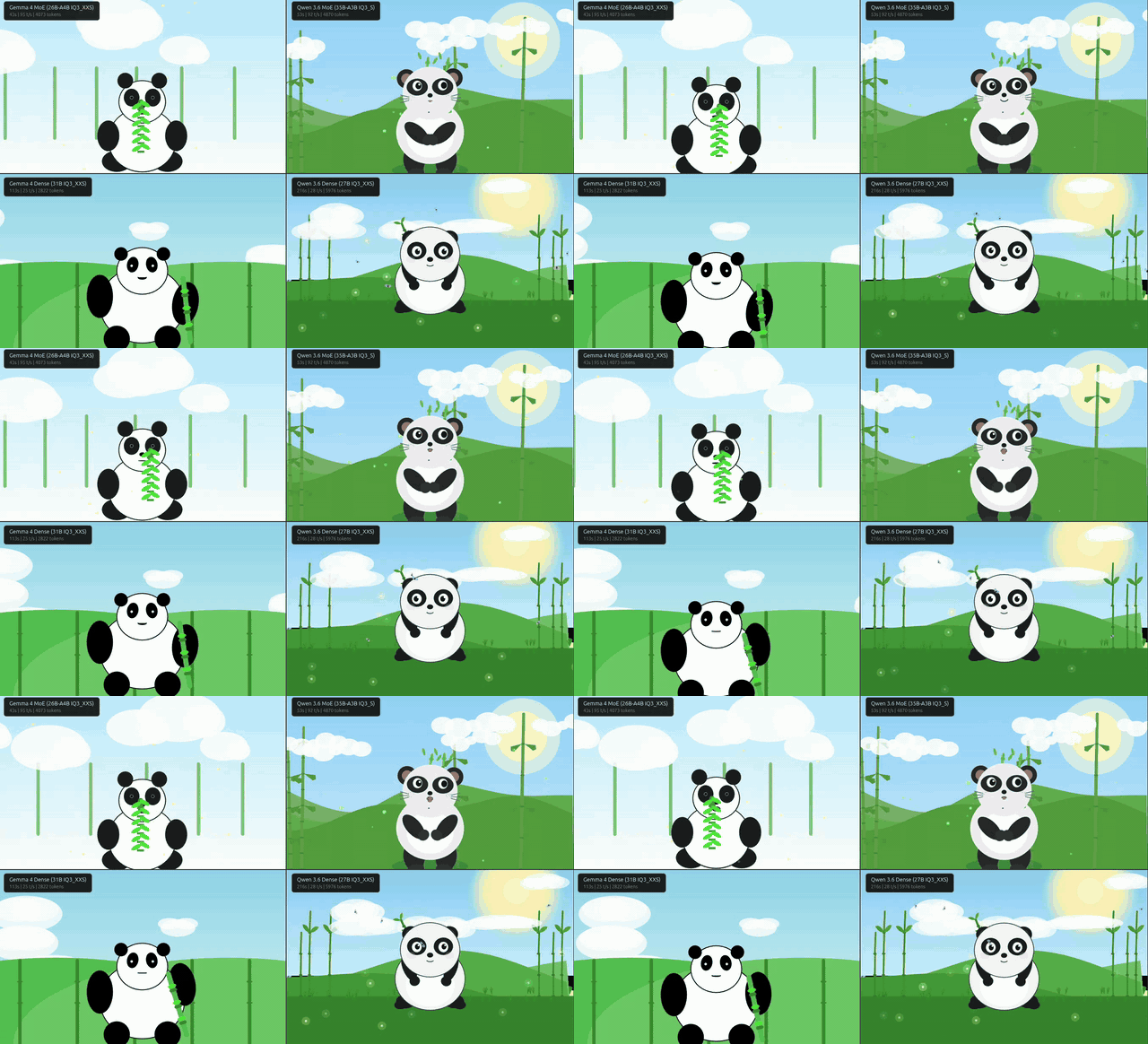
| Model | Time | Gen t/s | Tokens | Thinking | HTML | Works? | Bug |
|---|---|---|---|---|---|---|---|
| Gemma 4 MoE | 43s | 95 | 4,073 | 712 words | 235L | Yes | — |
| Qwen 3.6 MoE | 53s | 92 | 4,870 | 138 words | 454L | Almost | Missing CSS reset |
| Gemma 4 Dense | 113s | 25 | 2,822 | 381 words | 209L | Yes | — |
| Qwen 3.6 Dense | 216s | 28 | 5,976 | 268 words | 512L | No | let scale shadows p5’s scale() |
p5.js was kinder — no import maps, no module system. Both Gemma outputs worked. Qwen MoE had a cosmetic scrollbar. Qwen Dense drew a beautiful background with hills, bamboo, clouds, and fireflies — but no panda. let scale shadowed p5.js’s global scale() function, turning it into a number.
Round 4: Three.js Giraffe on a Bicycle
Back to Three.js, this time with API hints baked into the prompt — import maps, PMREMGenerator usage, RoomEnvironment import path, strict mode warnings.
View full prompt (includes Three.js API reference)
Create a single standalone index.html file that renders a 3D scene of a cartoon giraffe riding a bicycle using Three.js loaded from a CDN.
Three.js quick reference (r160+, ES modules only):
- Import map:
<script type="importmap">{"imports":{"three":"https://unpkg.com/three@0.160.0/build/three.module.js","three/addons/":"https://unpkg.com/three@0.160.0/examples/jsm/"}}</script> - Use
<script type="module">with:import * as THREE from 'three'; import { OrbitControls } from 'three/addons/controls/OrbitControls.js'; - Geometries: BoxGeometry, SphereGeometry, CylinderGeometry, TorusGeometry, TubeGeometry(curve, segments, radius, radialSegments, closed), RingGeometry, ConeGeometry, LatheGeometry(points, segments)
- Curves for tubes: CatmullRomCurve3([Vector3, …]), QuadraticBezierCurve3(v1,v2,v3)
- Materials: MeshStandardMaterial({color, roughness, metalness}), MeshPhysicalMaterial({…clearcoat})
- Environment: use PMREMGenerator + RoomEnvironment from ‘three/addons/environments/RoomEnvironment.js’ — call pmremGenerator.fromScene(new RoomEnvironment()).texture, do NOT call compile() or compileEquirectangularShader()
- Groups: new THREE.Group(), group.add(mesh)
- Transforms: mesh.position.set(x,y,z), mesh.rotation.set(x,y,z), mesh.scale.set(x,y,z)
- Shadows: renderer.shadowMap.enabled=true, light.castShadow=true, mesh.castShadow=true, ground.receiveShadow=true
- Animation: use requestAnimationFrame loop, THREE.Clock for elapsed time
- IMPORTANT: In ES modules (strict mode), never assign to undeclared variables. Never redeclare const/let variables. Declare all variables before use.
Requirements:
- Build everything procedurally (no external model files) — use combined Three.js geometries
- GIRAFFE character (cartoon style):
- Tall long neck made of cylinders/tubes, yellow-orange body color with brown spots (use small brown sphere/box meshes scattered on the body and neck)
- Rounded body (ellipsoid/scaled sphere), four legs with hooves
- Head with two small ossicones (horns), ears, big friendly eyes, snout
- The giraffe is SITTING on the bicycle saddle, legs reaching down to pedals
- Legs should animate: pedaling motion (rotating with the cranks)
- BICYCLE:
- Simple bicycle frame (diamond shape from tubes/cylinders)
- Two wheels with spokes (TorusGeometry for tires, CylinderGeometry for spokes radiating from hub)
- Handlebars, saddle, pedals with cranks
- Wheels should spin as the giraffe pedals
- The giraffe’s front legs/hooves grip the handlebars
- ANIMATION:
- Pedaling animation: cranks rotate, giraffe legs follow, wheels spin in sync
- Gentle swaying/bobbing of the giraffe’s body as it pedals
- Optional: slight head bob, tail swish
- SCENE:
- Green ground plane (grass-like color)
- Soft lighting with shadows
- Light blue or gradient sky background
- OrbitControls for camera
- Responsive viewport
- The scene should be cheerful and whimsical
Output ONLY the complete HTML file, no explanation before or after.
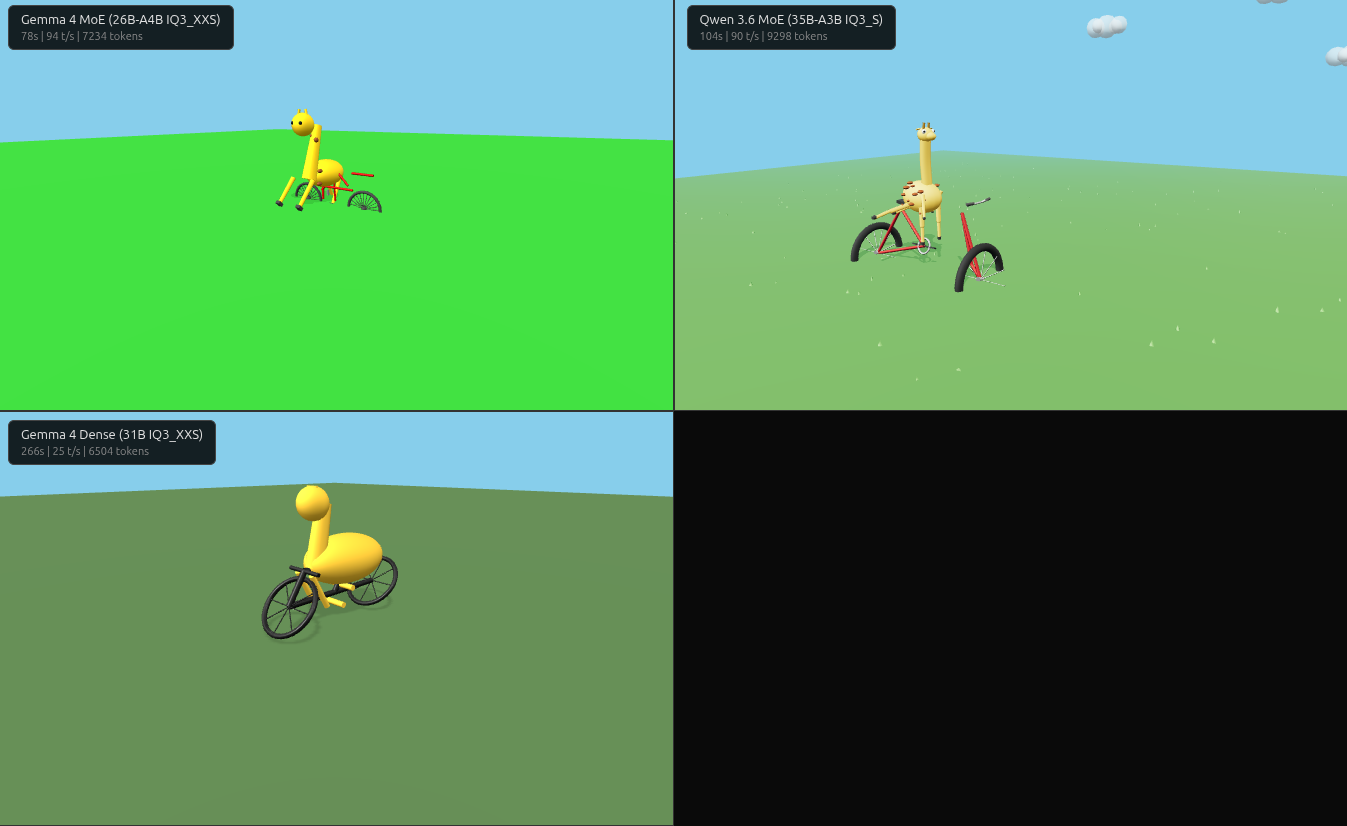
| Model | Time | Gen t/s | Tokens | Thinking | HTML | Works? | Bugs |
|---|---|---|---|---|---|---|---|
| Gemma 4 MoE | 78s | 94 | 7,234 | 1,306 words | 342L | Yes | 0 |
| Qwen 3.6 MoE | 104s | 90 | 9,298 | 466 words | 720L | No | 1 |
| Gemma 4 Dense | 266s | 25 | 6,504 | 1,318 words | 305L | No | 3 |
| Qwen 3.6 Dense | TIMEOUT | — | — | — | — | — | — |
Despite the API hints, none of the models nailed the spatial layout.
Gemma MoE ran without errors but the giraffe is rotated 90 degrees — facing perpendicular to the bicycle. The wheels look good and spin correctly though.
Qwen MoE built the best-looking giraffe (visible spots, cartoon proportions, fog and clouds) but used new THREE.RoomEnvironment() instead of the named import — the exact mistake the API hints warned about. After fixing it, the individual bicycle parts look good — wheels, frame, handlebars are all recognizable — but it’s definitely not assembled correctly, and the giraffe stands next to it rather than sitting on it.
Gemma Dense had three bugs (garbled viewport meta, missing renderer arg, wrong RoomEnvironment usage). After fixes, it had the most natural riding pose — but the wheels rotate around the wrong axis. 3.4x slower than MoE for buggier output.
Qwen Dense timed out at 600s with no output. Second time it choked on a complex Three.js prompt.
The Pattern
| Model | Avg Time | Avg Tokens | Clean Outputs | Total Bugs |
|---|---|---|---|---|
| Gemma 4 MoE | 52s | 4,846 | 4/4 | 0 |
| Qwen 3.6 MoE | 102s | 9,098 | 1/4 | 3 |
| Gemma 4 Dense | 143s | 3,865 | 1/4 | 5 |
| Qwen 3.6 Dense | 326s* | 8,873* | 0/4 | 8+ |
*Qwen Dense averages exclude Round 4 (timeout)
Gemma MoE never produced a runtime bug. Fastest (52s avg), most concise, never hit token limits. Qwen generated 2–3x more code with better visual design — but every output had at least one bug. The dense models were not competitive: 3.5x slower, buggier, and Qwen Dense timed out on the most complex prompt.
My Take
Gemma trades detail for reliability. Its F1 car was simpler but spatially correct. Its giraffe ran without errors but faced the wrong way. Zero bugs across four rounds, but the outputs are consistently simpler — fewer stars, no cable routing, no fog effects.
Qwen trades reliability for ambition. 12,000-star starfields, brake disc geometry, a giraffe with actual brown spots. When it works, it looks better than Gemma. But its detailed geometry doesn’t always translate into correct 3D — the giraffe stood next to the bike, the F1 car had spatial misalignments. The bugs were all trivial (typos, wrong imports, redeclarations) — the kind a linter or one round of feedback would catch.
Dense models don’t justify the tradeoff on consumer GPUs. Both dense variants underperformed their MoE counterparts in every round — slower, buggier, no better spatial reasoning. At IQ3_XXS quantization on 16 GB, MoE preserves quality better because it activates fewer parameters per token, so fewer weights are lossy-compressed during the forward pass. At higher quants or on 24+ GB cards, the dense models might close the gap — but on a 5060 Ti, 3060, or 4060 Ti, MoE wins unconditionally.
One shot is not the whole story. This benchmark is deliberately harsh — no error feedback, no iterating. In practice, AI coding tools like Claude Code or Copilot run in a loop: generate, check for errors, fix, repeat. With a feedback loop, Qwen’s trivial bugs would get caught on the first retry, and its superior design sense would shine through. But for raw single-shot generation quality on consumer hardware — the kind of “generate and pray” you do when prototyping or when your agent doesn’t have a browser — MoE models are the clear winner.
For local code generation on 16 GB VRAM, the recommendation is the same as for inference speed: MoE wins. A 52-second turnaround lets you prompt-tweak in real time. But if I had to pick one model family for coding regardless of hardware — Qwen’s design sensibility with a linter in the loop would be hard to beat.
One follow-up I’d like to try: llama.cpp supports --reasoning-budget N to cap thinking tokens. Gemma spent 2–8x more tokens thinking than Qwen — does that extra reasoning actually improve code quality, or is it wasted compute? Running the same prompts with --reasoning-budget 0 (no thinking) vs unrestricted could answer that.
The views and opinions expressed here are my own and do not reflect those of my employer.